Everyone has written about deadlocks, so wanted to try something different.
The Prisoner’s Dilemma
Two suspects are arrested and held in separate rooms. Each is offered a deal to testify against the other and go free while the other serves the full sentence. If both stay silent, both serve a short sentence. If both testify, both serve a long one.
Neither can communicate with each other, so neither knows what the other will do.
| Suspect B stays silent | Suspect B testifies | |
|---|---|---|
| Suspect A stays silent | Both serve 1 year | A serves 10, B goes free |
| Suspect A testifies | A goes free, B serves 10 | Both serve 5 years |
The rational move for each suspect is to testify. So both testify, and both lose.
Your Transactions Are the Prisoners
Transaction A locks SalesOrderHeader and wants ProductInventory. Transaction B locks ProductInventory and wants SalesOrderHeader. Neither releases what it holds, so both wait.
| Transaction B releases | Transaction B holds | |
|---|---|---|
| Transaction A releases | Both complete | B completes, A fails |
| Transaction A holds | A completes, B fails | Deadlock |
SQL Server solves this by killing one of them. The victim’s work is rolled back, and the other transaction completes.
Producing a Deadlock
Here’s a way to produce a deadlock in AdventureWorks2022.
Open two separate query windows in SSMS (File > New Query, twice), both connected to AdventureWorks2022, and each window is its own connection. Run each statement one at a time, in the order shown left to right.
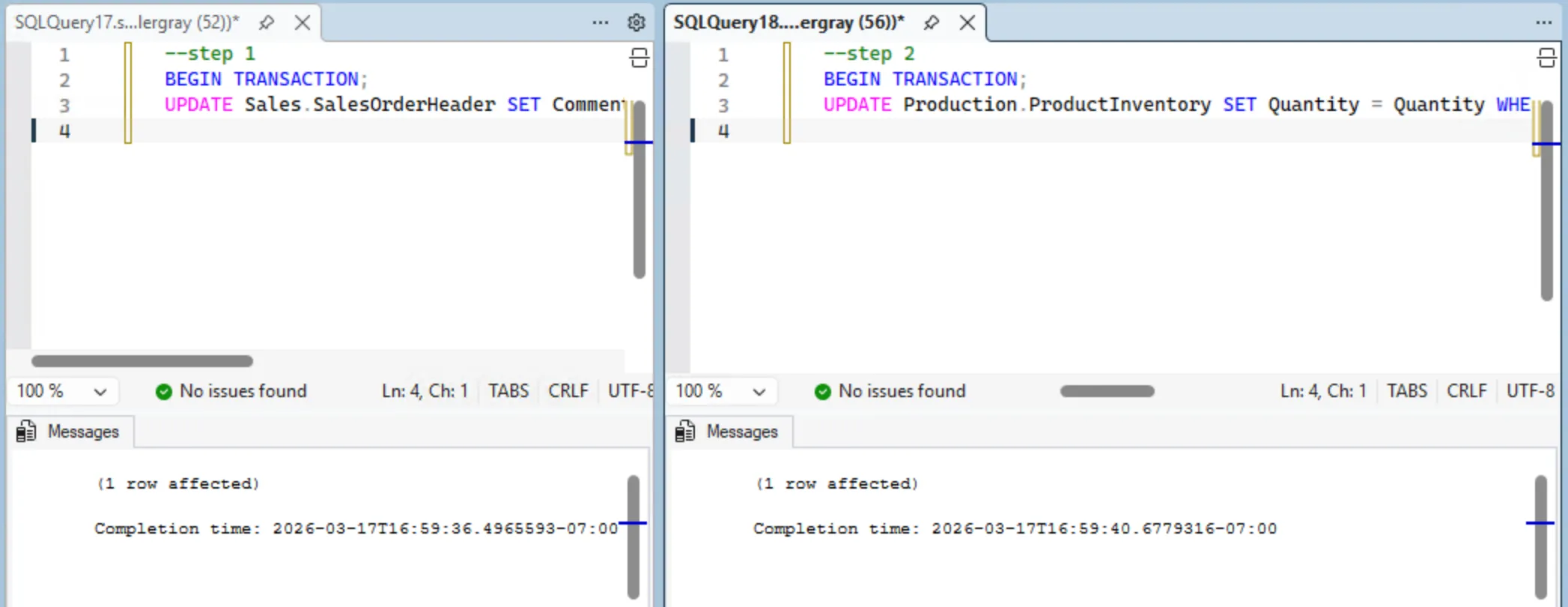
| Step | Session 1 | Session 2 |
|---|---|---|
| 1 | BEGIN TRANSACTION;UPDATE Sales.SalesOrderHeader SET Comment = 's1' WHERE SalesOrderID = 43659; | |
| 2 | BEGIN TRANSACTION;UPDATE Production.ProductInventory SET Quantity = Quantity WHERE ProductID = 1 AND LocationID = 1; | |
| 3 | UPDATE Production.ProductInventory SET Quantity = Quantity WHERE ProductID = 1 AND LocationID = 1;(hangs, waiting for Session 2) | |
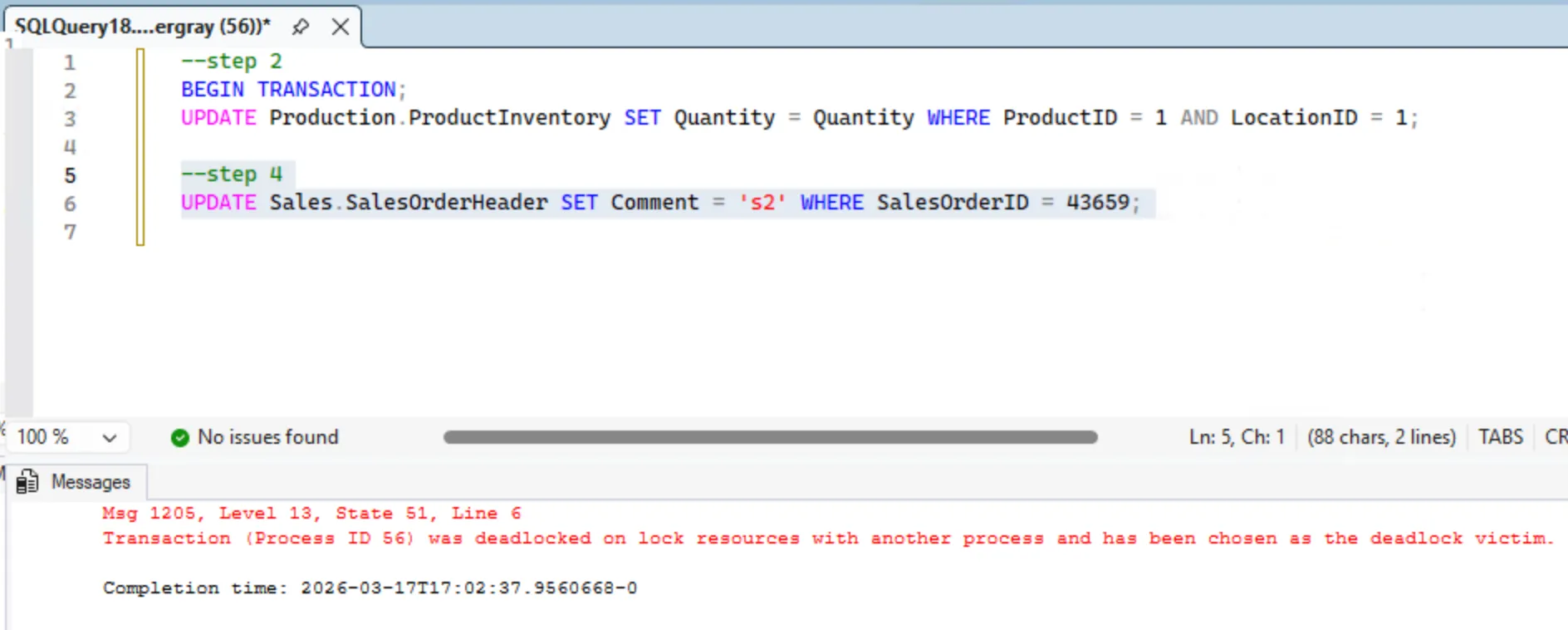
| 4 | UPDATE Sales.SalesOrderHeader SET Comment = 's2' WHERE SalesOrderID = 43659;(deadlock, 1205) |
After Step 2, both sessions hold one lock each. After Step 3, Session 1 is blocked waiting on Session 2’s lock.
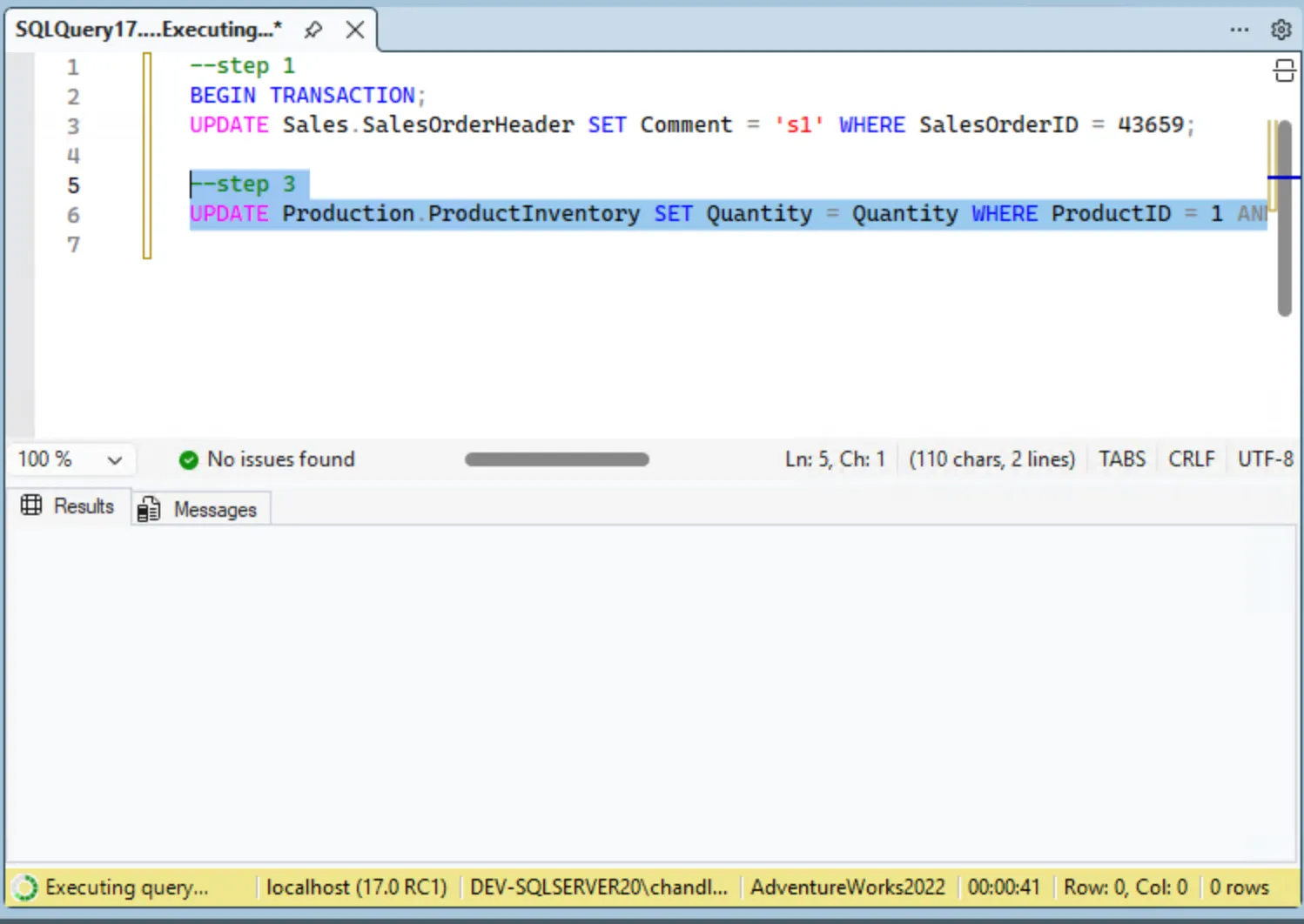
Step 4 creates whats called a “circular wait”: Session 1 is waiting on Session 2, and now Session 2 is waiting on Session 1. Neither can make progress because each holds what the other needs. SQL Server detects this cycle and immediately kills one session with error 1205.
Additionally, you can see the deadlocks in the system_health Extended Events deadlock graph:
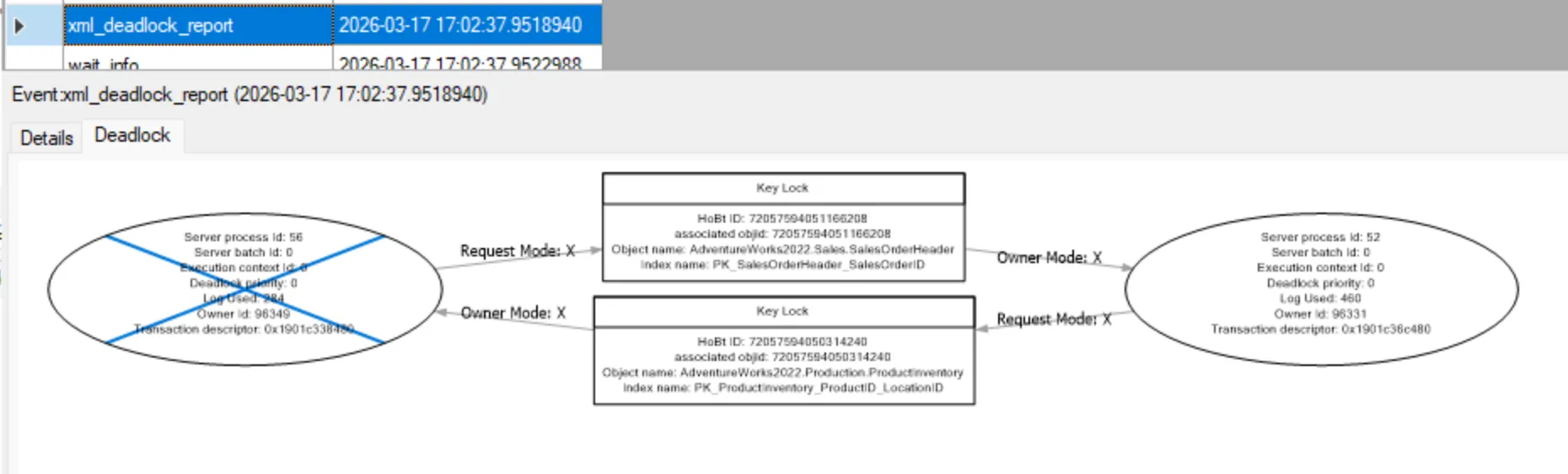
This graph is the prisoner’s dilemma drawn by SQL Server. Just two nodes with arrows pointing at each other. The victim is the one SQL Server chose to kill.
The Cooperative Strategy
In the prisoner’s dilemma, if the prisoners could agree on a strategy beforehand, staying silent becomes the best choice. In SQL Server, that agreement is call “consistent lock ordering”. The repro deadlocked because Session 1 locked the tables in one order and Session 2 locked them in the opposite order. If both sessions always lock SalesOrderHeader before ProductInventory, the circular wait can’t form.
| Step | Session 1 (consistent order) | Session 2 (consistent order) |
|---|---|---|
| 1 | Locks SalesOrderHeader | (waiting) |
| 2 | Locks ProductInventory | (waiting) |
| 3 | Commits, releases both | Locks SalesOrderHeader |
| 4 | Locks ProductInventory | |
| 5 | Commits, releases both |
No circular wait so both complete.
That’s one fix, but if you can’t control the lock order, or deadlocking is still a recurring problem, there are a few other options.
Read Committed Snapshot Isolation
If you can’t control lock ordering, say the queries come from an ORM or a vendor application, consider enabling Read Committed Snapshot Isolation (RCSI) at the database level.
ALTER DATABASE YourDatabase SET READ_COMMITTED_SNAPSHOT ON;With RCSI enabled, queries no longer take shared locks, instead they read the last committed version of the row from tempdb. This eliminates the most common class of reader-writer deadlocks without changing any query code. Writers still block writers, but reads stop getting deadlocks entirely. The tradeoff is that tempdb gets more traffic.
Optimized Locking (SQL Server 2025+ / Azure SQL)
If you’re on Azure SQL Database or SQL Server 2025, Optimized Locking changes how the engine holds row locks. Normally a transaction acquires a lock on every row it touches and holds all of them until commit. With Optimized Locking, each row lock is released as soon as the row is written, and the transaction instead holds a single lightweight lock on its Transaction ID (TID). Fewer locks held for less time means fewer opportunities for a deadlock cycle to form.
It requires two things to be enabled before it can be turned on:
-- Accelerated Database Recovery is a prerequisite
ALTER DATABASE AdventureWorks2022 SET ACCELERATED_DATABASE_RECOVERY = ON;

-- RCSI unlocks the full benefit (Lock After Qualification)
ALTER DATABASE AdventureWorks2022 SET READ_COMMITTED_SNAPSHOT ON;
Then enable Optimized Locking:
ALTER DATABASE AdventureWorks2022 SET OPTIMIZED_LOCKING = ON;On Azure SQL it’s already on by default. On SQL Server 2022 and older it isn’t available.
Is it the best option? If you’re on a version that supports it and you already have RCSI on, as far as I can tell, enabling it is low-risk and worth doing. Writer-writer deadlocks on the same rows can still happen. Lock ordering fixes the structural cause. Optimized Locking reduces how often that structure becomes a problem.
Retry Logic in the Application
I actually find this solution to be perfectly fine for most systems, and I see this out in the wild more often than RCSI.
Since the 1205 error message is something the application can read it’s easy to retry. SQL Server rolls back the victim and leaves the other transaction intact. A simple retry loop in the application handles it.
If you’re hitting deadlocks often enough that retries matter, the actual problem is still there and worth addressing. It just depends on how you define “often” and “matter”. If it’s a rare occurrence and the cost of retries is low, this might be good enough.
Controlling the Victim
When SQL Server detects a deadlock, it picks the transaction cheapest to roll back, measured by the amount of transaction log that would need to be undone. You can override that with SET DEADLOCK_PRIORITY. The range is -10 to 10. The session with the lower value gets killed first. If both sessions have the same priority, SQL Server falls back to log cost.
-- Make this session the preferred deadlock victim
SET DEADLOCK_PRIORITY LOW;   -- equivalent to -5

-- Protect this session from being chosen
SET DEADLOCK_PRIORITY HIGH;  -- equivalent to 5

-- Set a specific numeric value
SET DEADLOCK_PRIORITY -3;
This is useful when one transaction is cheap to retry and another is expensive. Set the cheap one to LOW and SQL Server will consistently sacrifice it, keeping the expensive one alive. It’s an interesting solution but I’ve actually never seen it actually used in production. That’s not to say it’s bad, just that it’s not common.
The key takaway from all of this is that frequent deadlocks are a sign that something is a problem. Two transactions acquiring the same resources in opposite order will always produce one eventually. Fix the order, eliminate the cycle.