Everyone has written about deadlocks, so I wanted to try something different.
The Prisoner’s Dilemma
Two suspects are arrested and held in separate rooms. Each is offered a deal to testify against the other and go free while the other serves the full sentence. If both stay silent, both serve a short sentence. If both testify, both serve a long one.
They can’t talk to each other, so neither knows what the other will do.
| Suspect B stays silent | Suspect B testifies | |
|---|---|---|
| Suspect A stays silent | Both serve 1 year | A serves 10, B goes free |
| Suspect A testifies | A goes free, B serves 10 | Both serve 5 years |
The rational move for each suspect is to testify, so both testify and both serve five years.
Your Transactions Are the Prisoners
Transaction A locks SalesOrderHeader and wants ProductInventory. Transaction B locks ProductInventory and wants SalesOrderHeader. Neither releases what it holds, so both wait.
| Transaction B releases | Transaction B holds | |
|---|---|---|
| Transaction A releases | Both complete | B completes, A fails |
| Transaction A holds | A completes, B fails | Deadlock |
SQL Server solves this by killing one of them. The victim’s work is rolled back, and the other transaction completes.
Producing a Deadlock
Here’s a way to produce a deadlock in AdventureWorks2022.
Open two separate query windows in SSMS (File > New Query, twice), both connected to AdventureWorks2022. Each window is its own connection. Run each statement one at a time, in step order.
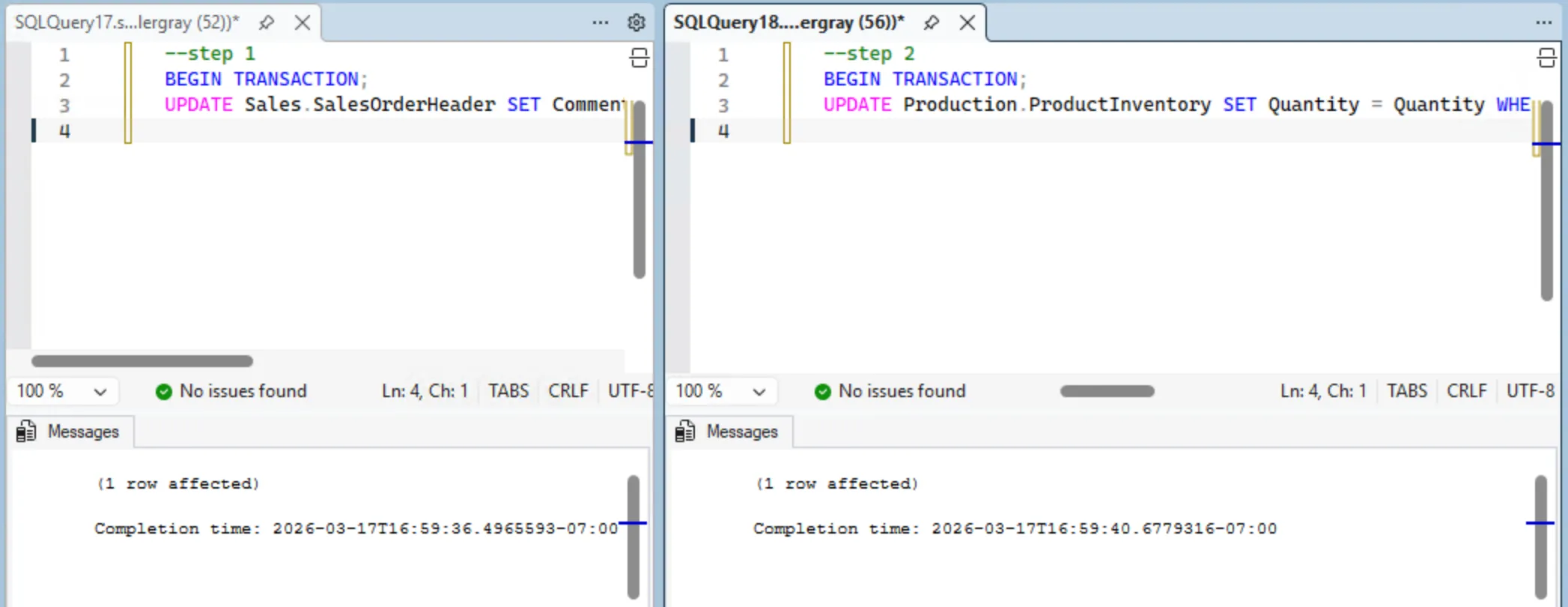
| Step | Session 1 | Session 2 |
|---|---|---|
| 1 | BEGIN TRANSACTION;UPDATE Sales.SalesOrderHeader SET Comment = 's1' WHERE SalesOrderID = 43659; |
|
| 2 | BEGIN TRANSACTION;UPDATE Production.ProductInventory SET Quantity = Quantity WHERE ProductID = 1 AND LocationID = 1; |
|
| 3 | UPDATE Production.ProductInventory SET Quantity = Quantity WHERE ProductID = 1 AND LocationID = 1;(hangs, waiting for Session 2) |
|
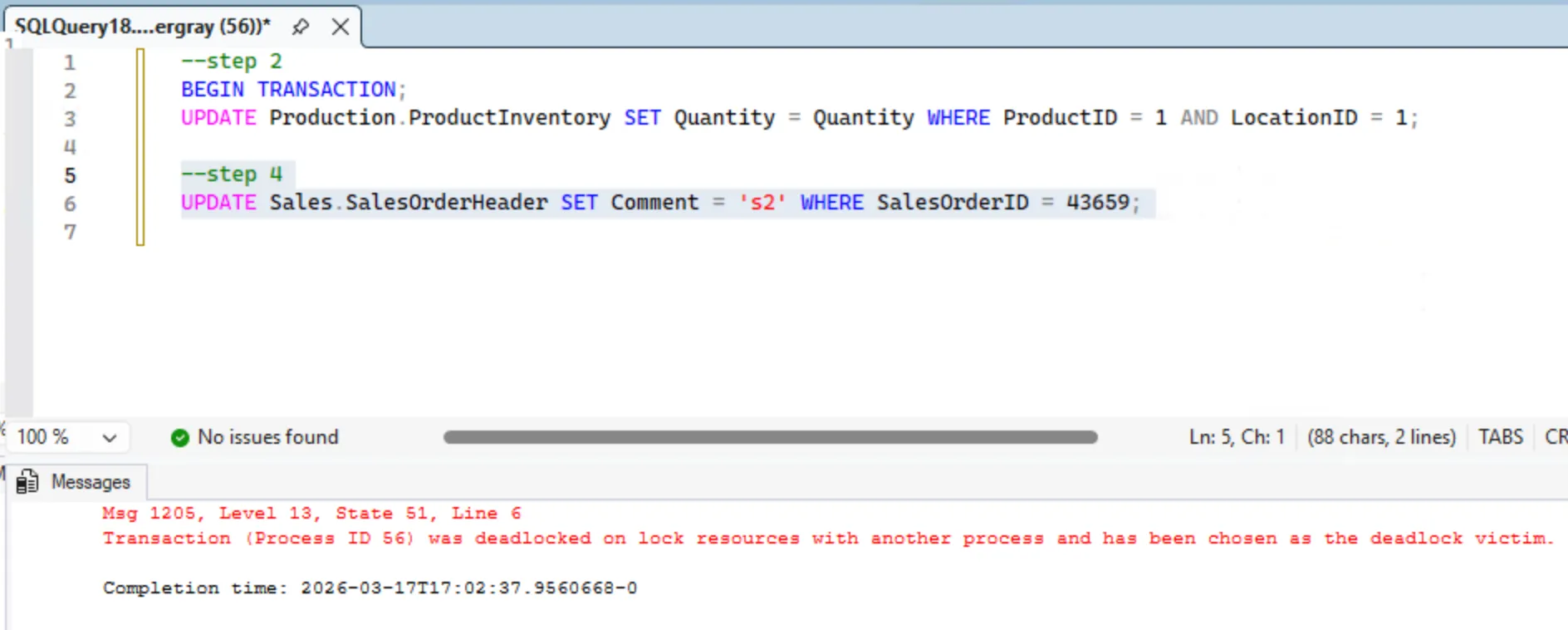
| 4 | UPDATE Sales.SalesOrderHeader SET Comment = 's2' WHERE SalesOrderID = 43659;(deadlock, 1205) |
After Step 2, both sessions hold one lock each. After Step 3, Session 1 is blocked waiting on Session 2’s lock.
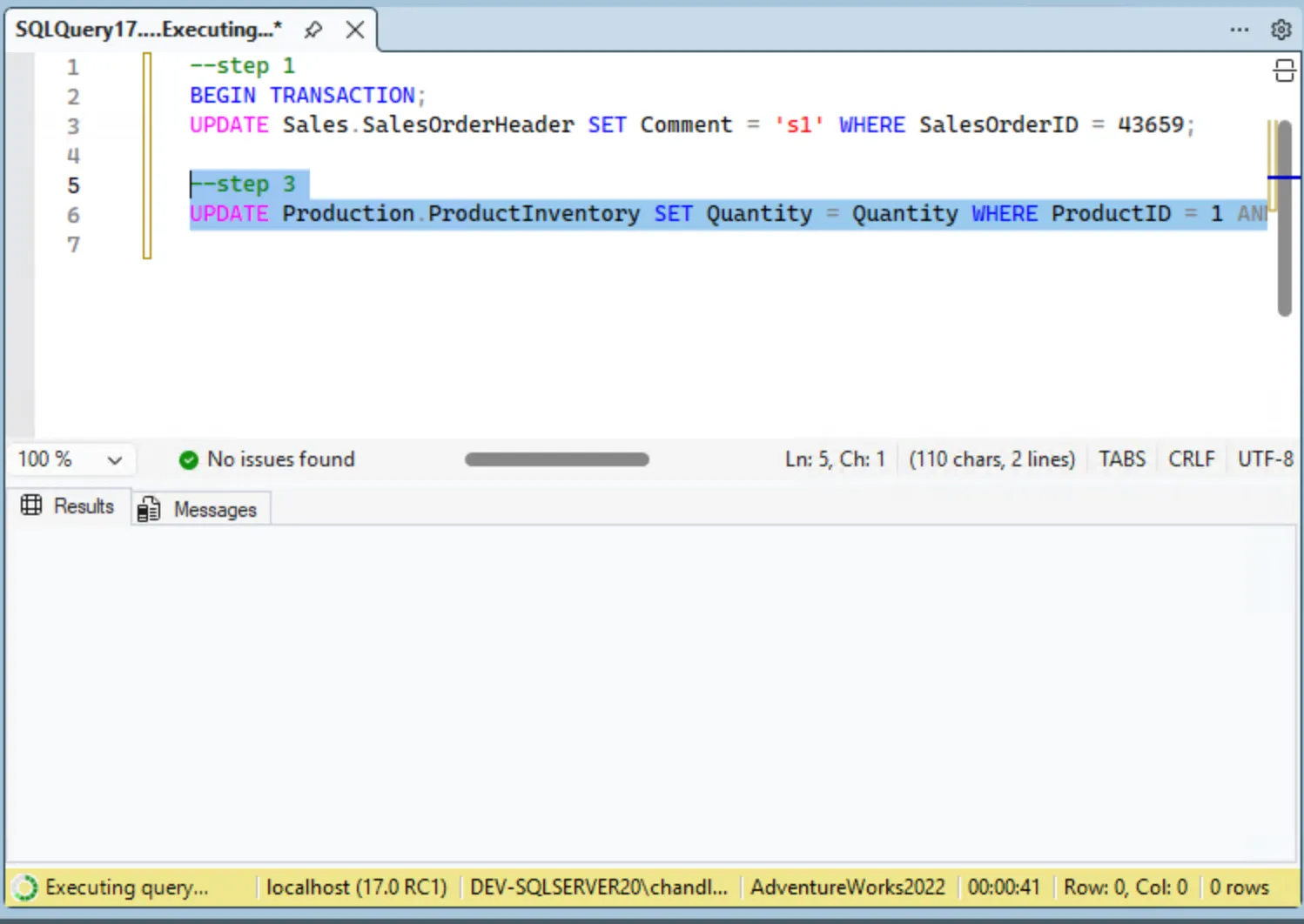
Step 4 creates what’s called a “circular wait”: Session 1 is waiting on Session 2, and now Session 2 is waiting on Session 1. Neither can make progress because each holds what the other needs. SQL Server’s deadlock monitor finds the cycle and ends one session with error 1205. It isn’t instant. Microsoft’s deadlocks guide says the monitor checks every 5 seconds by default, and more often, down to 100 milliseconds, while it keeps finding deadlocks.
You can also see the deadlock in the deadlock graph. The same guide says the system_health Extended Events session, which is on by default, “captures xml_deadlock_report events,” so there’s nothing extra to set up:
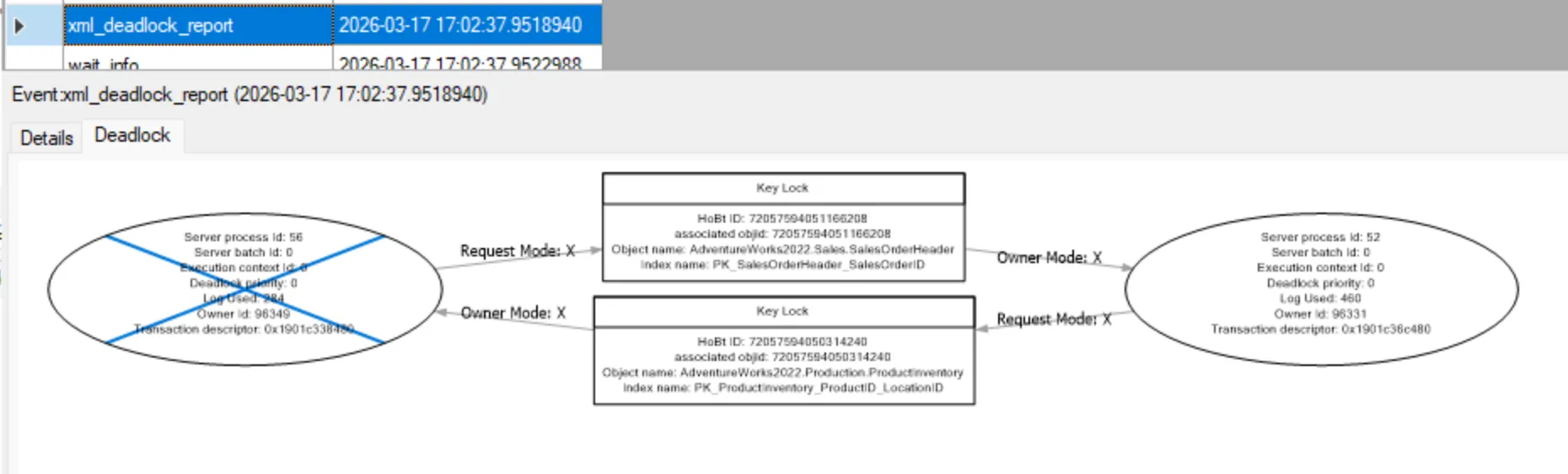
This graph is SQL Server’s drawing of the prisoner’s dilemma, with two nodes and arrows pointing at each other. The victim is the one SQL Server chose to kill.
The Cooperative Strategy
In the prisoner’s dilemma, if the prisoners could agree on a strategy beforehand and trust each other to keep it, staying silent becomes the best choice. In SQL Server, that agreement is called “consistent lock ordering”. The repro deadlocked because Session 1 locked the tables in one order and Session 2 locked them in the opposite order. If both sessions always lock SalesOrderHeader before ProductInventory, the circular wait can’t form.
| Step | Session 1 (consistent order) | Session 2 (consistent order) |
|---|---|---|
| 1 | Locks SalesOrderHeader |
(waiting) |
| 2 | Locks ProductInventory |
(waiting) |
| 3 | Commits, releases both | Locks SalesOrderHeader |
| 4 | Locks ProductInventory |
|
| 5 | Commits, releases both |
There’s no circular wait, so both complete.
That’s one fix, but if you can’t control the lock order, or deadlocking is still a recurring problem, there are a few other options.
Read Committed Snapshot Isolation
If you can’t control lock ordering, say the queries come from an ORM or a vendor application, consider enabling Read Committed Snapshot Isolation (RCSI) at the database level.
ALTER DATABASE YourDatabase SET READ_COMMITTED_SNAPSHOT ON;With RCSI enabled, reads stop taking the row and page locks they used to and instead read the last committed version of the row. It’s close to say reads stop taking shared locks, but not exact. The locking and row versioning guide says “Read operations require only the schema stability (Sch-S) table level locks and no page or row locks,” so there’s still a lock, it’s just not one that a writer is going to collide with. That removes the most common class of reader-writer deadlocks without changing any query code. Writers still block writers.
Those row versions get kept in tempdb, and the tempdb documentation lists version stores among the things tempdb holds, including “row versions that are generated by data modification transactions in a database that uses row versioning-based READ COMMITTED or SNAPSHOT isolation transactions.” So this moves work into tempdb rather than removing it, which is worth knowing on an instance where tempdb is already busy.
Optimized Locking (SQL Server 2025+ / Azure SQL)
If you’re on Azure SQL Database or SQL Server 2025, Optimized Locking changes how the engine holds row locks. Normally a transaction acquires a lock on every row it touches and holds all of them until commit. With Optimized Locking, each row lock is released as soon as the row is written, and the transaction instead holds a single lightweight lock on its Transaction ID (TID). Fewer locks held for less time means fewer opportunities for a deadlock cycle to form.
The optimized locking documentation says accelerated database recovery (ADR) must be enabled first. RCSI isn’t required, but the lock after qualification part of optimized locking only works with it on, so it’s worth enabling too:
-- Accelerated Database Recovery is a prerequisite
ALTER DATABASE AdventureWorks2022 SET ACCELERATED_DATABASE_RECOVERY = ON;

-- RCSI is what gives you the full benefit (Lock After Qualification)
ALTER DATABASE AdventureWorks2022 SET READ_COMMITTED_SNAPSHOT ON;
Then enable Optimized Locking:
ALTER DATABASE AdventureWorks2022 SET OPTIMIZED_LOCKING = ON;It’s always enabled on Azure SQL Database and on Azure SQL Managed Instance with the Always-up-to-date or 2025 update policy. On SQL Server 2025 it’s available but off by default, and SQL Server 2022 and older don’t have it.
If you’re on a version that supports it and you already have RCSI on, as far as I can tell enabling it is low-risk and worth doing. Writer-writer deadlocks on the same rows can still happen. Lock ordering fixes the cause, and Optimized Locking only makes it come up less often.
Retry Logic in the Application
I find this perfectly fine for most systems, and I see it in the wild more often than RCSI.
The application gets error 1205 back, so it’s easy to catch and retry. SQL Server rolls back the victim and leaves the other transaction intact. A simple retry loop in the application handles it.
If you’re hitting deadlocks often enough that retries matter, the actual problem is still there and worth addressing. It just depends on how you define “often” and “matter”. If it’s a rare occurrence and the cost of retries is low, this might be good enough.
Controlling the Victim
By default, SQL Server picks the transaction that’s least expensive to roll back. You can override that with SET DEADLOCK_PRIORITY, and the priority is checked first. The documentation says “If the sessions have different deadlock priorities, the session with the lowest deadlock priority is chosen as the deadlock victim,” and when the priorities match, SQL Server “chooses the session that is less expensive to roll back.”
The range is -10 to 10, and NORMAL, the default, is 0. So if nobody has set a priority, every session is at 0 and the choice comes down to rollback cost. The deadlocks guide adds that if the priority and the cost are both the same, “a victim is chosen randomly.”
-- Make this session the preferred deadlock victim
SET DEADLOCK_PRIORITY LOW;   -- equivalent to -5

-- Protect this session from being chosen
SET DEADLOCK_PRIORITY HIGH;  -- equivalent to 5

-- Set a specific numeric value
SET DEADLOCK_PRIORITY -3;
This is useful when one transaction is cheap to retry and another is expensive. Set the cheap one to LOW and SQL Server will consistently sacrifice it, keeping the expensive one alive. It’s an interesting option, but I’ve never seen it used in production. That doesn’t make it bad, just uncommon.
The key takeaway from all of this is that frequent deadlocks are a sign that something is wrong. Two transactions acquiring the same resources in opposite order will produce one eventually. Retry logic, deadlock priority and optimized locking make it less likely or less costly, but fixing the order is what removes the cycle.